 PhotoPlan Software
PhoToPlan is a software for true-to-scale
rectification of digital images of plane objects. It works
under AutoCAD and AutoCAD LT.
The
result is a versatile image plan, that allowes an easy measurement
of areas and distances. The image plan connects photographic
documentation of the present state with exact geometrical
information. Rectified images can be used to draw plans
of façades or gain geometrical data of ceilings and
wall frescos.
We offer
two different versions of PhoToPlan: A professional version
and a low-cost basic version for beginners.
Under
concept you will find more information about the procedure
of image rectification and the possible applications for
PhoToPlan and PhoToPlan BASIC.
To derive geometric information from photographs is a task
often set in architecture, preservation of historic buildings,
building engineering and archeology. On the original photograph
the shown objects normally appear distorted because of position
and orientation of the camera. For instance on a photograph
of a façade this effect becomes obvious at the converging
vertical edges. Image rectification is the process by which
the photograph is reorganized and a true-to-scale image plan
is created. On the resulting image the vertical edges become
parallel and the image has a defined scale.
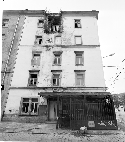 |
 |
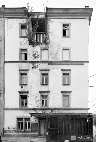 |
| Distorted Original |
|
Rectified Image |
To get a true to scale image plan a digital photograph and
additional reference information on the object is required.
That means, it is necessary to take a defined number of measurements
from the object. These measurements can be control points
or control distances. During the rectification process the
reference measurements are assigned to the image. Using these
assigned information the image can be transformed (rectified)
arithmetically to a true to scale image plan. The plane where
the reference measurements (control points, control distances)
are located is called rectification plane. All parts of the
object that are situated exactly in this plane are reproduced
in true scale on the rectified image, elements that are not
situated in this plane remain distorted. example façade: You
take a photograph of the relevant part of the façade. As reference
measurements you choose points or distances that lie within
the façade. They are measured by tachymeter, tape measure
or hand held laser. On the rectified image all elements at
the façade plane are shown in true scale, whereas a sloping
roof or a balcony remains distorted. They can be rectified
in a separate process.
A comparison of Autodesk CAD Overlay and kubit PhoToPlan for
the perspective rectification of photos in archaeology. At
the FHTW in Berlin Dominik Westermann, graduate in the subject
of restoration/excavation techniques, wrote his diploma dissertation
on the theme of Photogrammetry and Digital Photography applied
to the Technique of Excavation. For this he examined the practical
application of rectifying individual images as a method of
documentation on archaeological excavations. Amongst other
things he compared the two rectification programmes PhoToPlan
and CAD Overlay using a comprehensive practical test. The
following article describes the results of the comparison.




 ©
www.ejmotiwalla.com 2005 • 36 Persiaran Ampang • 55000 •
Kuala Lumpur • MALAYSIA • Tel: (603)42577786 • Fax:
(603)42562922 • Emails: motico@tm.net.my - sales@ejmotiwalla.com
©
www.ejmotiwalla.com 2005 • 36 Persiaran Ampang • 55000 •
Kuala Lumpur • MALAYSIA • Tel: (603)42577786 • Fax:
(603)42562922 • Emails: motico@tm.net.my - sales@ejmotiwalla.com